
TALENT: I am a Minor, how can I register?
Overview
FastCast requires all users under 18 to undergo Guardian Verification when signing up. This guide provides an overview of the minor registration process, account verification steps, profile setup, and answers to frequently asked questions for users. While minors can initiate registration, a parent or legal guardian must grant consent, manage the account, and retain access until ownership is transferred.
Step-by-Step Minor Registration Flow
Step 1: Select a Subscription Plan
Choose your preferred subscription tier (Career, Rising Star, Dreamer, or Monthly Plan).
Tap Continue.
Step 2: Enter Basic Information
On the Let's Get Started screen, enter your First Name and Last Name.
Optionally enter your Email ID.
Select your Date of Birth using the date picker.
Choose your Location (e.g., PAN India).
Tap Next.
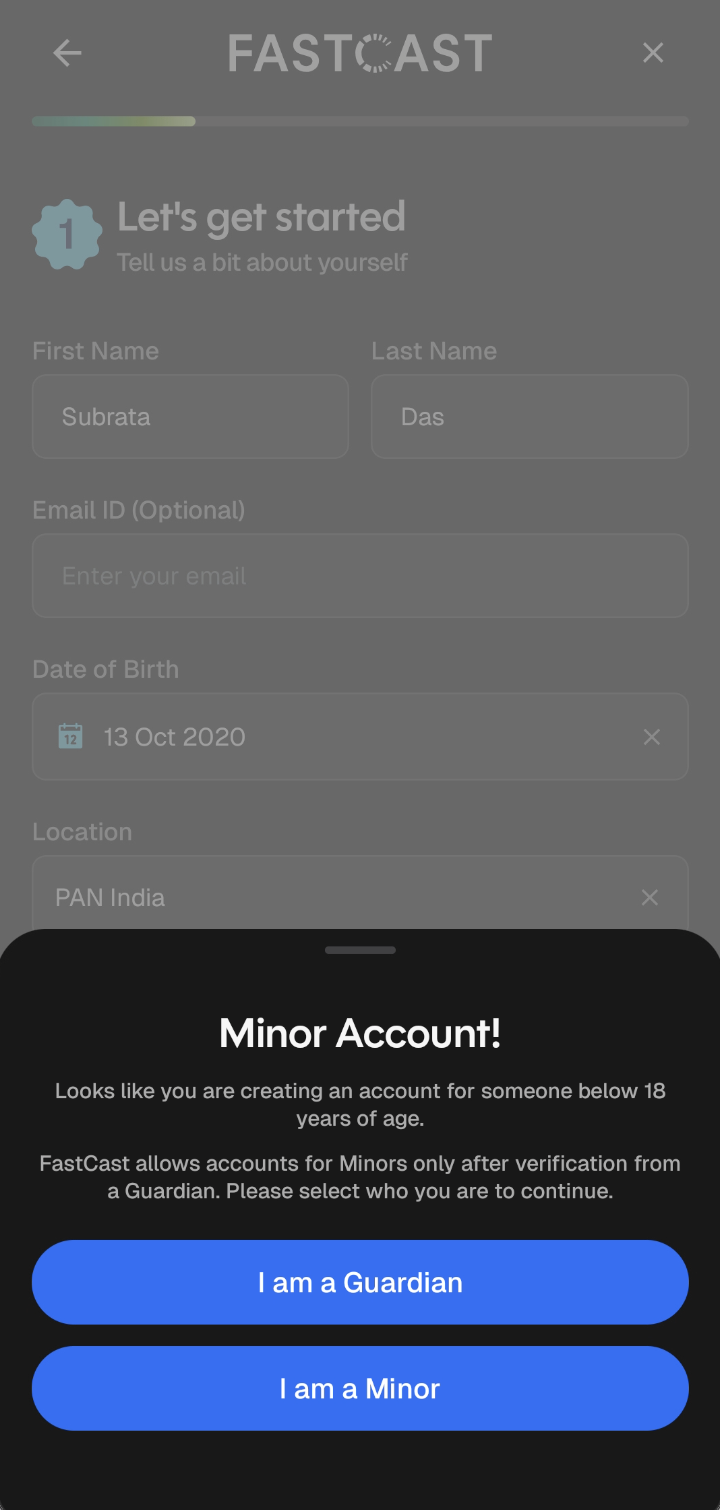
Step 3: Minor Account Prompt
If the selected Date of Birth indicates you are under 18, the Minor Account! A prompt will be displayed.
Select 'I am a minor' to proceed to the verification screen.
Step 4: Guardian Verification Details
Enter the full name of the guardian.
Select the Relationship from the dropdown menu (Parent or Legal Guardian).
Enter Guardian’s mobile number.
Check the consent box agreeing to the Privacy Policy and Terms on behalf of the guardian and minor.
An OTP will be sent to the guardian's mobile number.
Enter the OTP, tap on verify and continue.